WINDOWS HOW-TO GUIDES

Find Windows upgrade logs and SetupDiag results

After a failed Windows upgrade, look for SetupDiagResults.xml under %WinDir%\Logs\SetupDiag. Match it to the latest failed attempt, then use its phase and failure details to choose the relevant Setup logs.

On this page
  1. Find the SetupDiag result
  2. Choose the log for the failed Setup phase
  3. Build a useful summary for support

Find the SetupDiag result

Open File Explorer and paste %WinDir%\Logs\SetupDiag into the address bar. If SetupDiagResults.xml is there, check that its time belongs to the upgrade you’re investigating. Windows Setup can run SetupDiag automatically after an unsuccessful upgrade.

If the result is missing, Microsoft’s SetupDiag guide explains how to obtain the tool and run it against the affected PC or a saved set of logs. Collect the logs before cleanup or another attempt removes them.

Choose the log for the failed Setup phase

During a downlevel attempt, look under %SystemDrive%\$Windows.~BT\Sources\Panther. For a rollback, check %SystemDrive%\$Windows.~BT\Sources\Rollback. The location varies with the phase and what Setup retained.

setupact.log records Setup activity. setuperr.log records errors. Use the failure time and phase to read the relevant entries together. A line containing Error may need earlier context to explain the failure.
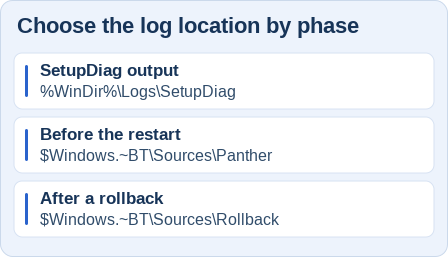
Choose the log location by phase. SetupDiag output. %WinDir%\Logs\SetupDiag Before the restart. $Windows.~BT\Sources\Panther After a rollback. $Windows.~BT\Sources\Rollback
Match the log to the same failed upgrade attempt.Enlarge

Build a useful summary for support

Record the source and target Windows builds, result and extend codes, failed phase, and any named driver or device. Include the time of the failure and the relevant log excerpt. Remove unrelated personal information before sharing privately.

If the result is 0xc1900101, use the driver evidence before changing packages. After another attempt, keep its diagnostics separately so the two failures can be compared.

References

MYTURBOPC

About this page preview

This local preview draws on Microsoft or manufacturer documentation. The illustrated examples show where to look or how to choose a step.

The procedure and individual driver packages have not been tested for this preview.