On this page
Find where the code appeared
Microsoft calls this error CBS_E_SOURCE_MISSING. Record which operation returned it. For a failed update, also note the KB number if Windows shows one.
- Open Settings → System → About.
- Under Windows specifications, note the edition, version and build. Under Device specifications, note the system type.
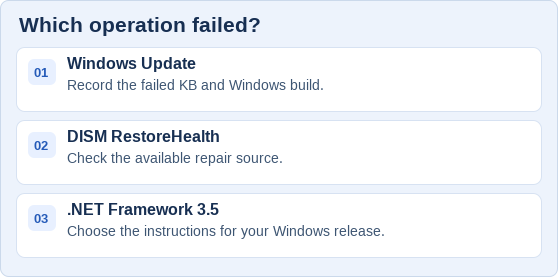
Start with the Windows Update branch
For a component store problem during Windows Update on a personal PC, open Command Prompt as an administrator and run DISM RestoreHealth. If DISM already returned 0x800f081f, skip to the repair source check. If you were installing .NET Framework 3.5, follow the instructions for your Windows release below.
DISM.exe /Online /Cleanup-Image /RestoreHealthIf the repair succeeds, retry the original Windows update. If DISM returns 0x800f081f, check the repair source before trying again.
Check the repair source
First check whether Windows Update is available as the repair source. On a managed PC, give IT the failed operation, exact error, Windows edition, build, system type and update KB if shown. IT can check which repair source the organization permits.
If you need a local source, use official Windows files that match the target release, edition, architecture and installed languages. The source must include the files required by your current servicing level. A source older than the target’s updates can still produce the same error.
A WIM file can contain several Windows editions. If Microsoft’s repair-source instructions call for a WIM, use its Wim: prefix and the index for your edition. Use /LimitAccess only when you intend DISM to use the supplied source without falling back to Windows Update.
Use the .NET 3.5 steps for your Windows release
Windows 11 26H1 and later use the standalone .NET Framework 3.5 installer. On an earlier supported release, follow Microsoft’s Windows feature instructions for that version. Check Settings → System → About before choosing the instructions.
Retry the original operation
Check whether the original update, DISM repair, or feature installation completes. If it fails again, record the new error along with the operation, Windows build and update KB if there is one.