WI-FI & NETWORK DRIVERS FOR WINDOWS
Find an official
Wi-Fi or Ethernet driver.
Use the PC maker’s support page for built-in Wi-Fi or Ethernet. For a separately purchased adapter, start with its manufacturer and match the exact model and Windows version.

LET’S FIND YOUR STARTING POINT
Where should you look for a driver?
This selects a manufacturer portal. It doesn’t detect your hardware or confirm a compatible driver package.
THE DETAILS THAT MAKE A DIFFERENCE
Match the device.
Then match the download.
If Wi-Fi stopped working and you’re unsure why, troubleshoot the connection first. If you need a driver, keep these three pieces of information together.
Your PC or adapter model
Use the complete model name. For a prebuilt PC, start with that PC’s manufacturer guidance, even if the wireless chip has another brand.
Intel’s guidance on PC-maker drivers (opens in new tab)The adapter’s identity
In Device Manager, find the affected adapter. If the name is ambiguous, open its Properties → Details and select Hardware Ids. Keep the full values.
Find hardware IDs in Device ManagerWindows version & system type
Check Settings → System → About. Record the Windows version/build and whether the system uses x64, x86 or ARM64 before checking package requirements.
Find your Windows device information (opens in new tab)
An official link is only the first check.
On the product page, confirm the exact device, Windows requirements, package notes and installation instructions. A newer version number alone doesn’t establish a match.
GO DIRECTLY TO THE MANUFACTURER
Official driver-source directory
Start with a source you can identify.
Check the package on the product page.
Links identify manufacturer portals, not reviewed individual packages. If a portal is unavailable, use that manufacturer’s support navigation or try again later. MyTurboPC has no manufacturer affiliation or endorsement.
WHEN THE PC CAN’T GET ONLINE
Prepare the download
before removing a driver.
Microsoft’s network guidance calls for a backup driver before uninstalling an adapter. If this PC is offline, download from its manufacturer on a connected PC and transfer the package using a USB drive.
Microsoft’s network guidance (opens in new tab)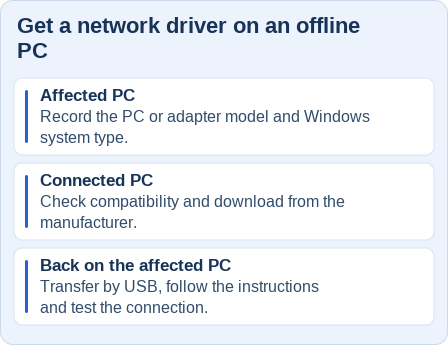
- 1
Record the device details
Take the exact model, Windows version and system type to the connected PC.
- 2
Use the official product page
Check the package’s applicability and download the instructions you’ll need offline.
- 3
Transfer, then follow the instructions
Keep the backup available and follow the manufacturer’s installation steps on the affected PC. Restart if prompted, then test the Wi-Fi or Ethernet connection you were trying to restore.
- 4
Check the result
Follow the driver update guide to confirm the installed version and test the connection.
A SEPARATE SOFTWARE OPTION
Considering software-assisted help?
Explore Advanced System Repair Pro as a third-party PC utility. Check its demonstrated capabilities and requirements before deciding whether it fits your situation.
ASR Pro is separate from the manufacturer downloads above. MyTurboPC may earn a commission from attributed purchases.NOT EVERY CONNECTION ISSUE IS A DRIVER ISSUE
A few things to check before you go
Microsoft Wi-Fi troubleshooting (opens in new tab)What if my PC is connected but has no internet?
Use the connection state to choose the investigation. Router, network and application checks may be relevant; a Wi-Fi driver download is not a diagnosis. Start with Microsoft’s connection guidance.
What if the adapter has an unknown name?
Keep the hardware IDs and PC model together. Use those details with the official manufacturer’s support process instead of treating a display name as proof of package compatibility.
Can I use a component-maker driver in a laptop?
Check the PC maker’s instructions first. Intel notes that OEM systems can have manufacturer-specific customizations. A generic component package is not automatically the right choice for a complete PC.
What about Windows 10?
Check the package’s actual operating-system requirements. Standard Windows 10 support ended October 14, 2025; edition and ESU arrangements can affect the Windows update path. Microsoft’s support context (opens in new tab)
Sources & review status
Documentation and portal identities consulted October 28, 2026. This page is a design preview; no individual driver package has been compatibility-reviewed or installed. Independent technical review and version-specific tests remain open.